Story bible software that sits beside your manuscript
A story bible holds the facts of your book: who people are, what they want, where things are and when events happened. In Haven it lives next to the chapters, so you check it without leaving the page.
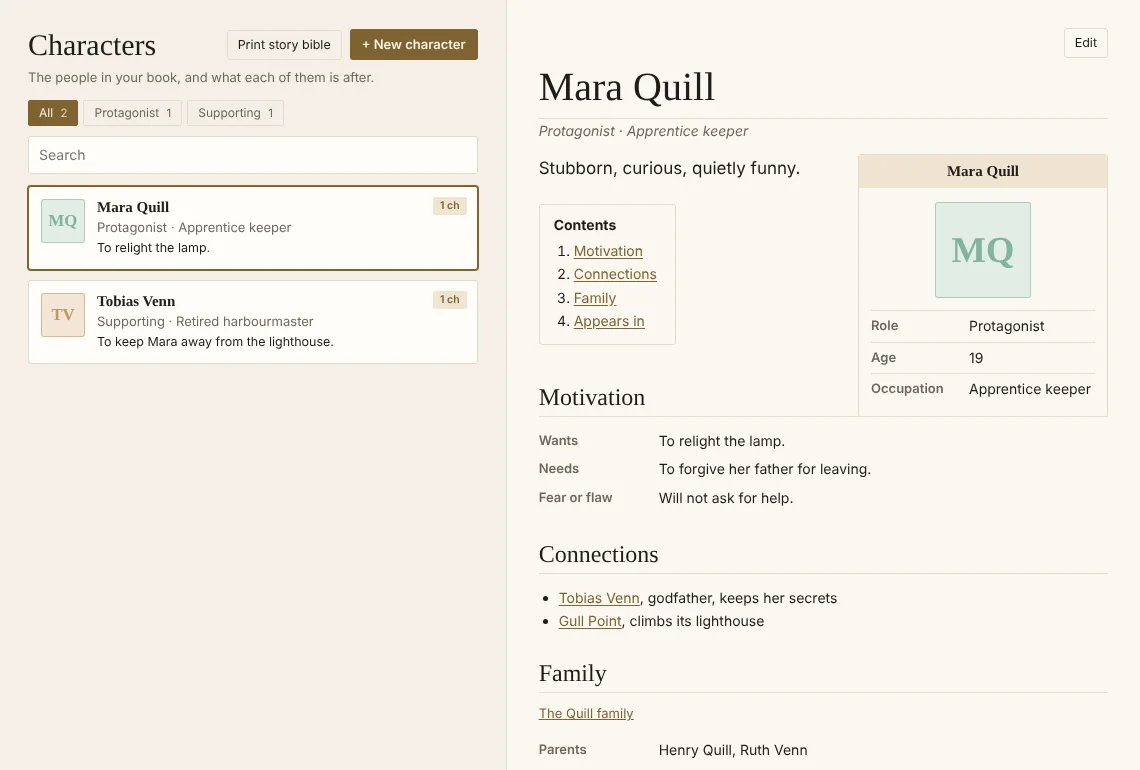
What goes in it
Each character has an article, with a facts box beside the text and sections for what they want, what they need, their flaw, their connections and their family. Places, factions, lore and objects get entries of their own. A timeline keeps your world’s events in order.
Every entry can have a picture, and your world can have a map.
Connected to the page
Names from your story are underlined in the chapter, and hovering one shows its card. Haven works out which chapters each character appears in and lists them on the article, so you can find every scene a person is in.
One printed document
Print the whole story bible as one document with a contents list, covering every character and place along with each character’s family from your trees. Save it as a PDF to share with an editor or co-writer. Printing is part of the Author plan.
Starting one
You do not need a template. Add a character from the Story section, or select a name while you write and add it from the page. For a prompt list of what to decide first, the character profile template has one.
Questions
What is a story bible?
A reference document for a book or series. It records characters, places, rules of the world and a timeline, so the details stay consistent from chapter to chapter.
Is it only for fantasy?
No. A crime novel needs to know where everyone was, and a memoir needs its people and dates in one place. The sections are the same.
Can I keep a bible for a series?
Each book has its own. For a series, make one book to hold the shared world and use the others for the stories.
Does it cost anything?
Writing and editing your story bible is part of the Free plan. Printing it as a PDF is part of the Author plan.