Havenfor writers

Novel writing software that keeps the whole book in one place

You type on a page set like a printed book. Your characters, places and outline sit beside it, and the finished draft exports as an EPUB, a Word file or a print PDF.

One book free, no card. Works in your browser and installs on a computer or phone.

The Lantern Keeper / The Stairs Saved

THE LANTERN KEEPER

Chapter one

The Stairs

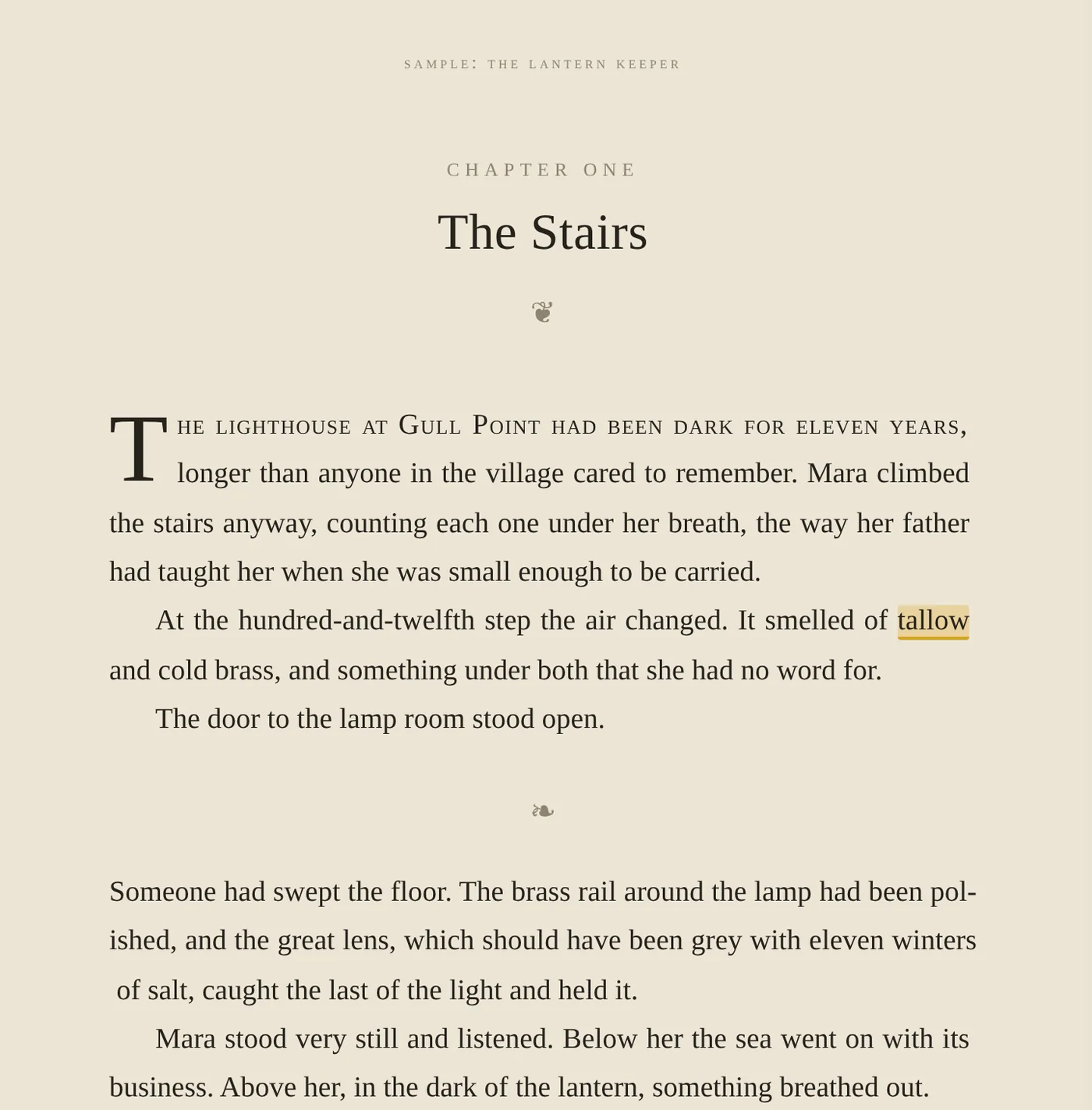
The lighthouse at Gull Point had been dark for eleven years, longer than anyone in the village cared to remember. Mara climbed the stairs anyway, counting each one under her breath, the way her father had taught her when she was small enough to be carried.

At the hundred-and-twelfth step the air changed. It smelled of tallow and cold brass, and something under both that she had no word for.

The door to the lamp room stood open.
78 words in this chapterRevisedA demo: nothing you type leaves this page.

What’s in Haven

Six parts, one window. Pick one to see it.

A page that looks like the book

Chapters are set like pages of a printed book, with a running head, a drop cap and justified text, so you see roughly how it will read. Focus mode hides the rest of the screen and keeps your line in the middle.

  • Saves as you type, and keeps earlier versions of every chapter
  • Daily goals, timed sprints and a 12-week calendar
  • Night and Paper themes, and a text size you can change
A chapter set like a printed page, with a drop cap and underlined names

An outline you can move around

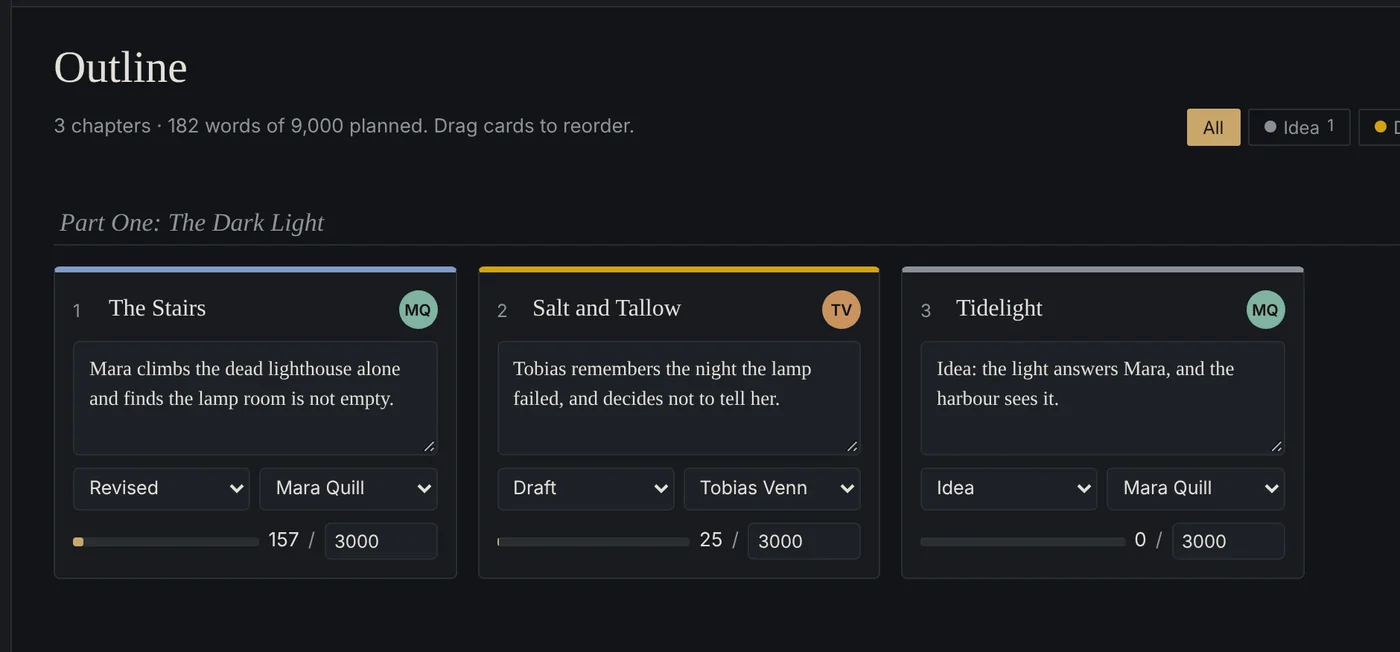
Each chapter gets a card with a summary, a status, a point-of-view character and a word target. Drag the cards to reorder the book, and group chapters into parts.

  • Notes for plot ideas, research and loose ends sit beside the page
  • Search finds a chapter, a character or any words in the book, and replace works across every chapter
The outline board with a card for each chapter

Characters that read like a wiki

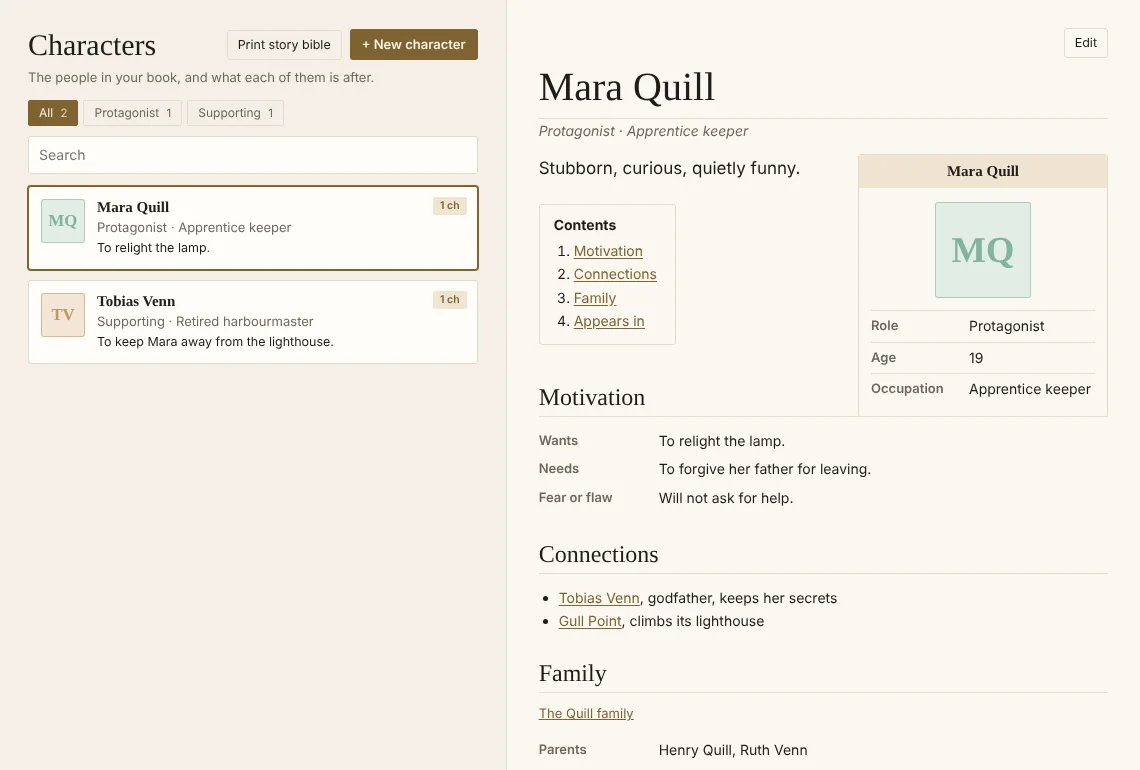
Every character gets an article with an infobox, their motivation, who they’re connected to and the chapters they appear in. Places, factions and lore work the same way, and you can print the lot as a story bible.

  • Names from your story are underlined on the page, and hovering one shows its card
  • A timeline keeps your world’s events in order
  • Add a picture to any character or place, and a map for your world
A character article with an infobox, motivation, connections and family

Family trees that draw themselves

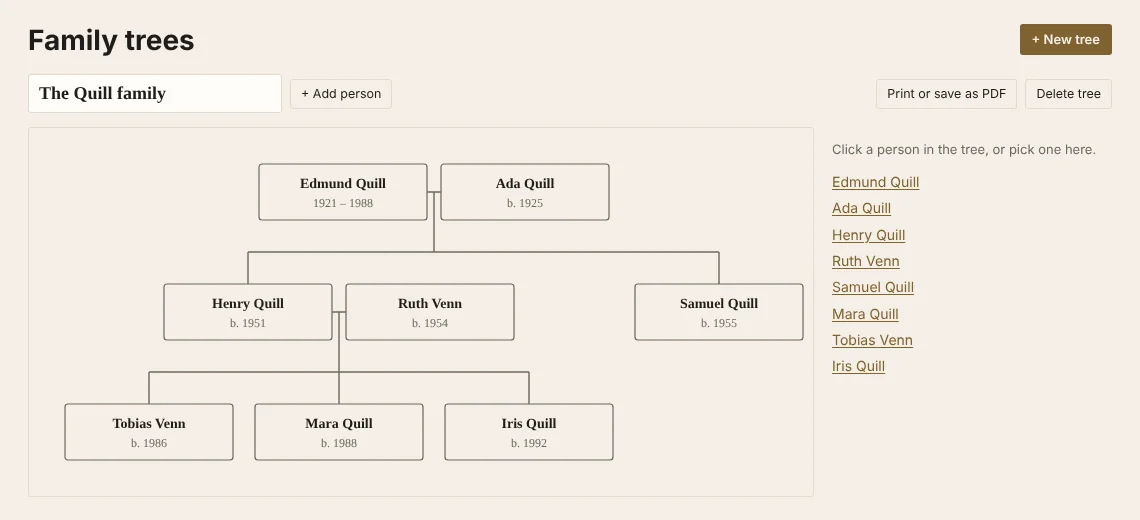
Say who each person’s parents and partner are and Haven lays out the tree. Add people from your character list, keep one tree for each family, and print it or save it as a PDF.

  • Couples, step-families and several generations lay out without overlapping
  • People linked to a character show up in that character’s article, and trees are part of the printed story bible
A family tree of three generations drawn from the people in the story

Write a screenplay in script format

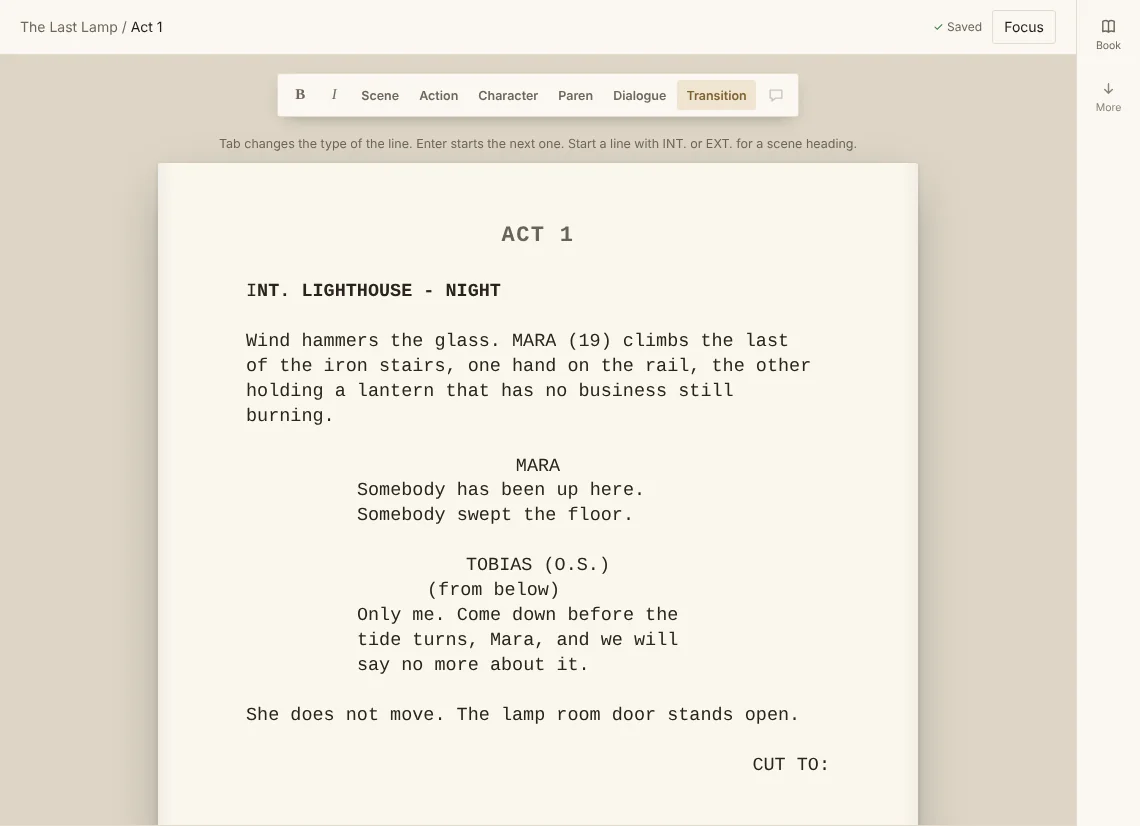
Start a book as a screenplay and the page is set the way scripts are. Tab changes the type of line and Enter starts the next one, so you can write a scene without touching the mouse.

  • Scene headings, action, character, parenthetical, dialogue and transitions
  • Exports a PDF in standard layout, a title page and Fountain text, and imports Fountain files
A screenplay page with a scene heading, action, dialogue and a transition

Share it and get comments back

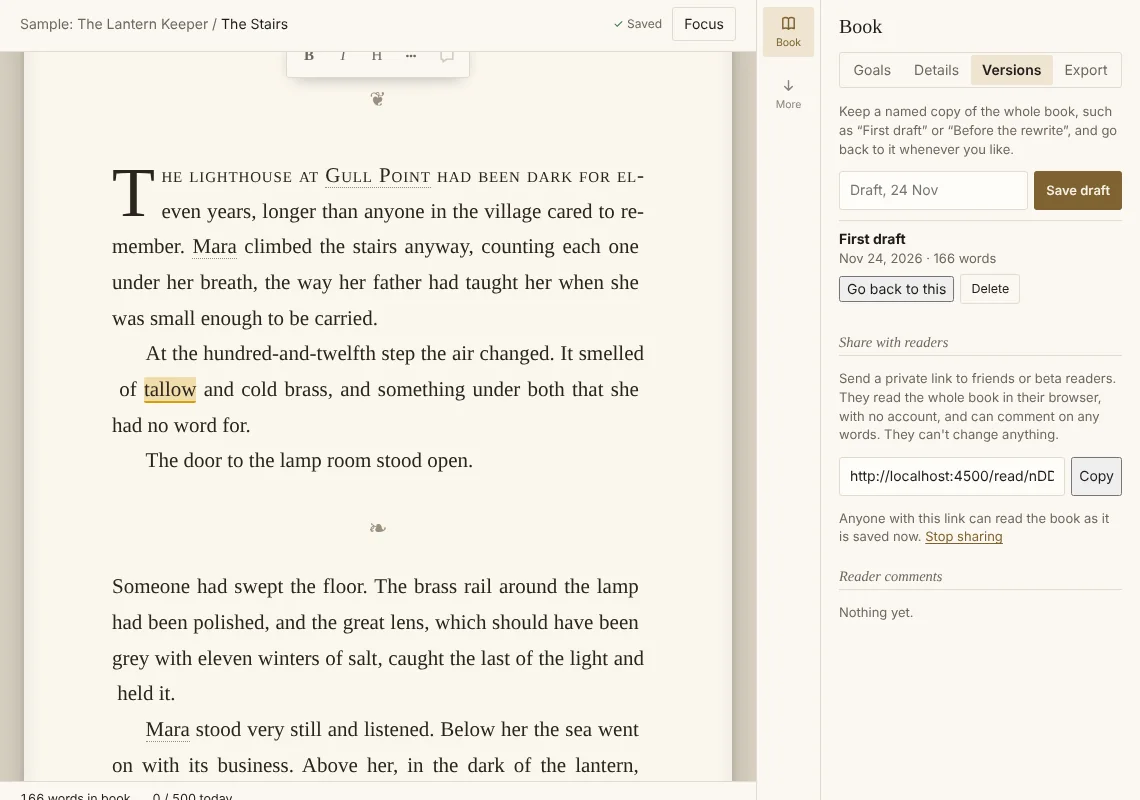
Send a private link and your readers read the book in their browser, with no account. They select any words to comment, and you read their comments beside your manuscript. Save a named draft first, so you can always go back.

  • Readers can’t change anything, and you can stop sharing at any time
  • Export EPUB, Word and PDF (6 × 9 in, A5 or US Letter)
  • Add a cover, a dedication, an epigraph and an author bio
The Book panel with named drafts and a link for beta readers

All the features

Plan the book on cards

Each chapter is a card with a summary, a status and whose point of view it’s told from. This is the outline of the sample book. Move it around.

  1. Chapter 1

    The Stairs

    Mara climbs the dead lighthouse alone and finds the lamp room is not empty.

    Mara
  2. Chapter 2

    Salt and Tallow

    Tobias remembers the night the lamp failed, and decides not to tell her.

    Tobias
  3. Chapter 3

    Tidelight

    The light answers Mara, and the harbour sees it.

    Mara
  4. Chapter 4

    Two Boats

    What really happened in the storm, told by the man who was on the wall.

    Tobias
  5. Chapter 5

    The Keeper’s Log

    Mara finds her father’s last entry, written after he left.

    Mara
Drag a card to move the chapter. With the keyboard, Alt and an arrow key moves the card you’re on.

Export when it’s done

The same chapters become a print PDF, an ebook or a manuscript for an agent. Pick one and see the first page.

Format
Page size
Book length

From first line to finished file

  1. Start a book

    Sign up and you land on Your books. Start a new book there, or import a Word file and Haven splits it into chapters.

  2. Write and plan

    Write on the page, keep your cast and world beside it, and set a daily goal if you like one.

  3. Revise

    Save named drafts, read earlier versions, and send beta readers a link to leave comments.

  4. Export

    Download an EPUB for ebook stores, a Word file for an editor, or a PDF set for print.

Write wherever you are

Haven runs in the browser, so the same books are there on any computer. If you want it in its own window or on your phone’s home screen, install it from the browser’s menu. It is the same account either way, and nothing needs downloading. How to install Haven.

Your writing stays yours

These hold on every plan, and they are also on the About page.

  • You own it. Everything you write is yours, and you can download every book on any plan.
  • No AI training. Your writing is never used to train AI, sold or shared, and there are no adverts.
  • Free stays free. The Free plan keeps one book with the full editor. If Haven ever shuts down, you get at least 90 days’ notice.
  • Small footprint. Your password is stored scrambled, one cookie keeps you signed in, and deleting your account deletes every book in it straight away (and from backups within 14 days). Card details go to Stripe and never reach Haven. The privacy policy has the detail.

Free tools, no account needed

What’s new

Haven changes often. Here are the latest releases, with every release in the patch notes.

27 November 2026

Ready for Cloudflare

Changed the sign-in and sign-up limits to count each visitor separately once Haven runs behind Cloudflare. Cloudflare’s own address for a visitor is only believed when the request really came through Cloudflare, so nobody can pick their own address to get around the limits

26 November 2026

Backup period in the privacy policy

Fixed the privacy policy to say backups are kept for 14 days, which is how long the server keeps them

26 November 2026

A pre-launch security and privacy check

Fixed email links being written to the server log on the live site while no email service is set up. Reset and confirmation links are keys to an account, so they are no longer logged

Your first book is free to write.

Open Haven, give the book a title and start on chapter one. No card, nothing to install.